 Kasitoma
Work
Projects and tasks where everyone knows their part
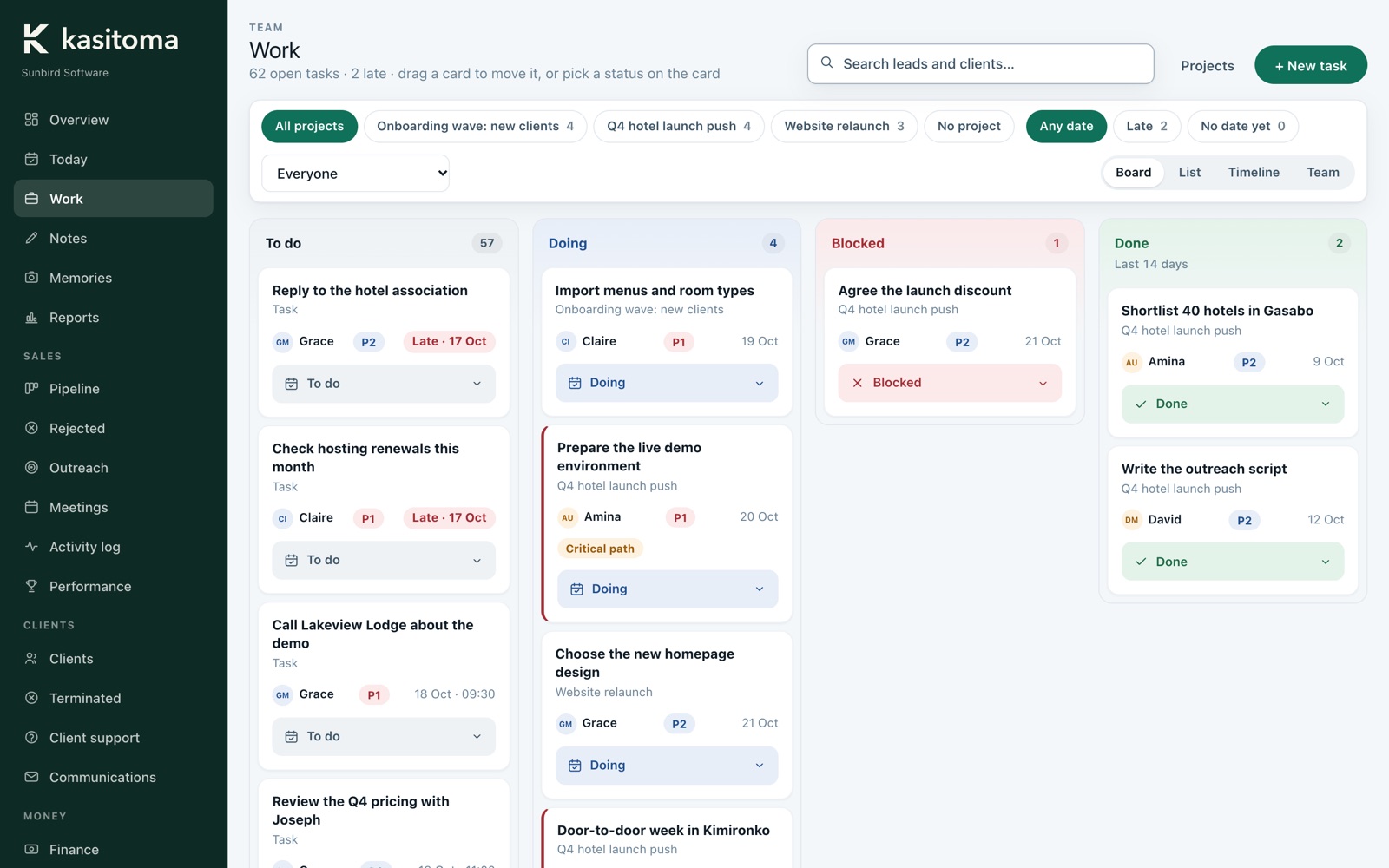
Kasitoma’s Work module gives small teams projects with their own columns, a task board you drag cards across, and RACI roles on every task: who does it, who signs it off, who is consulted and who is informed. Dependencies show what waits for what, reminders go out once a day, and each person starts from their own Today. Because it sits next to your clients and sales, the work you do for a client is never in a separate app.
Task and project management for small teams
Work is built for teams of a few people to a few dozen who need order without a course in project management. Projects hold their own columns; tasks hold the detail.
- Projects with their own columns, renamed and reordered by managers
- Tasks with a due date and time, priority, checklist and comments
- Status To do, Doing, Blocked (with a reason) or Done
- Board, list, timeline and team views
- A timeline that shows dependencies and the critical path
- Each person sees the tasks they are part of; the MD sees everyone’s
A task board with RACI roles
Most missed tasks were never clearly owned. RACI fixes that with four plain roles on every task.
- Responsible: the person doing the task
- Accountable: the person who signs it off, by default whoever created it
- Consulted and Informed: people asked for input or kept in the loop, and emailed when it matters
- Dependencies: finish-to-start links, so a task waits for the one before it
Invite, remind and export
Work reaches people who are not in Kasitoma yet, and leaves the app when you need it on paper.
- Invite someone by email straight from a task; the task is theirs before they join
- One reminder email a day per person for tasks due or late, with SMS as an option
- Emails to the people involved when something changes on their task
- Export the board, one column or a project to Excel or PDF with your logo
Ask your AI agent
With Kasitoma connected to Claude or ChatGPT, you can type things like:
- Give Aline a task to set up the new branch by Friday, with me as accountable and Grace informed.
- What do I have due today and this week?
- Move my task “Send the proposal” to next Monday and comment that we are waiting for prices.
- List everything overdue in the Website project and who is responsible for each task.
- Create a task for our new colleague grace@example.com to prepare the onboarding pack, and invite her.
Questions people ask
What is RACI, and do I have to use it?
RACI names four roles on a task: Responsible (does it), Accountable (signs it off), Consulted and Informed. In Kasitoma you can fill in only who does the task; Accountable defaults to whoever created it, and the other two are optional.
Can everyone see every task?
No. Each person sees the tasks they are part of: those they do, created, sign off, or are consulted or informed on. The MD sees everything and can give that right to others.
Does the task board work on a phone?
Yes. Kasitoma installs like an app from the phone’s browser. You can add tasks with quick add, tick them off and drag cards with a long press.
Can Claude or ChatGPT create and assign tasks?
Yes. Once connected, the agent can create tasks, give them to a colleague (even one invited who has not joined yet), change dates, comment and mark them done, all with your permissions.
Read next
Let your AI agent do the work
Start a free trial in a minute, connect Claude or ChatGPT, and hand it your sales, billing and admin today.
No card needed · works on any phone