 Kasitoma
Sales and outreach
A sales pipeline and field outreach in one place
Kasitoma gives sales teams a pipeline board for every lead and outreach campaigns for the work done outside the office: door-to-door canvassing and phone calls by district, with targets per period and visits logged from a phone. Managers see what each campaign cost per contact and per win, how each rep is doing and why deals were lost. It suits teams that sell by visiting and calling, not only by email.
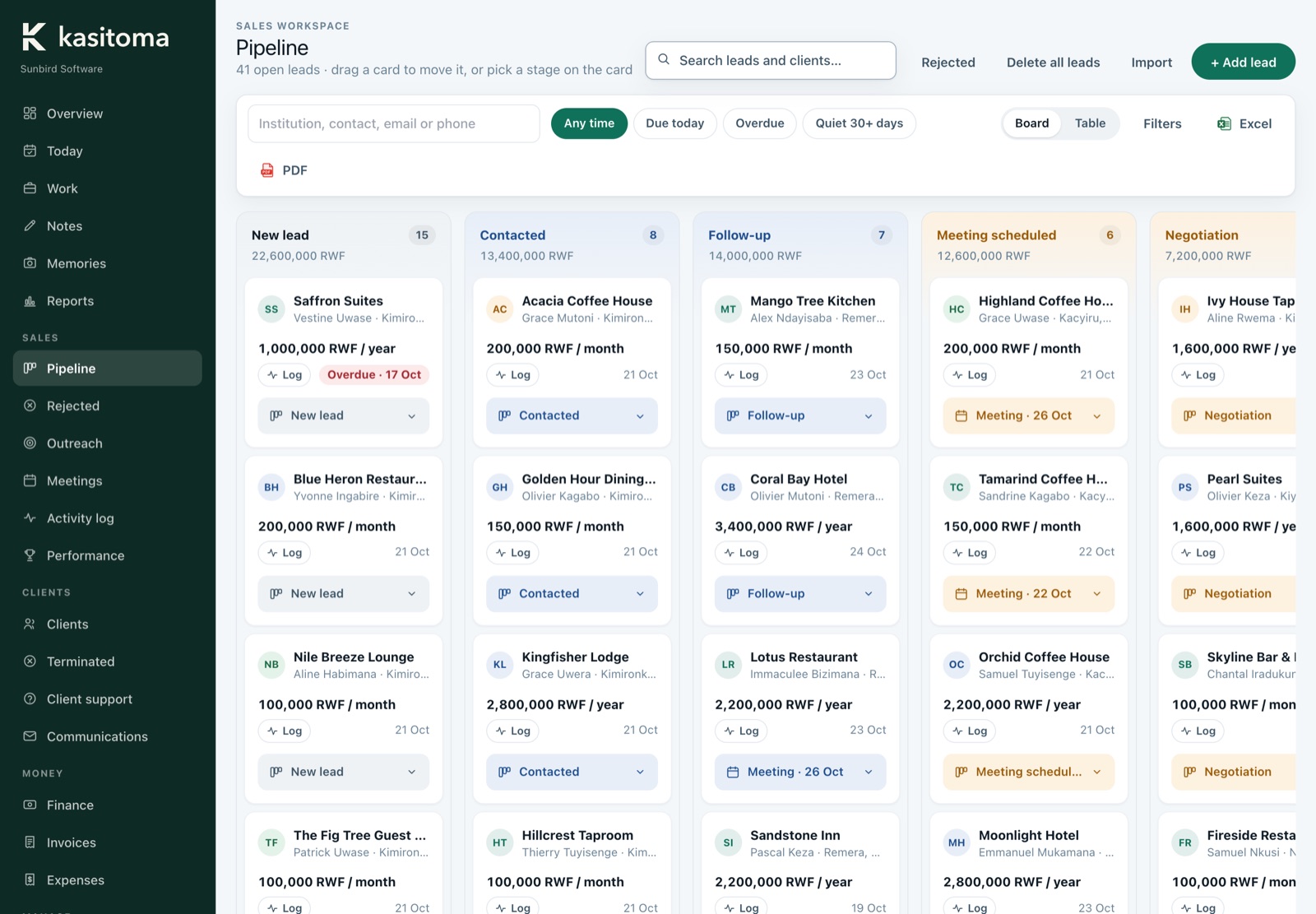
Sales pipeline software that fits the way you sell
The stages are yours: name them, give each one its chance of closing, and Kasitoma weights the open pipeline by stage. Won and lost always close the board.
- Import leads from Excel, with district and location columns
- Follow-ups due today and overdue, for each rep and for the team
- Meetings booked with reminders, then their outcome and next step
- Every call, visit, message and note on the lead’s page
- A won lead becomes a client with its package and billing
- Your own lead sources, business types and lost-deal reasons
A field sales app for door-to-door and phone campaigns
An outreach campaign is a planned push in one district: a list of businesses to reach, the people doing it, a period and targets. It is how Kasitoma does door-to-door sales tracking.
- Districts and locations from your own list, chosen from a dropdown or typed when new
- The campaign list built from a filter or from picked leads, given to one person or split by location
- Each visit or call logged as ordinary activity, with its outcome
- Prospects found in the field added as leads on the campaign
- Reps see only their own businesses and no money figures
- A budget, and a written outcome when the campaign ends
Know what outreach costs and what it brings
Outreach campaign management is mostly about knowing which efforts pay. Kasitoma puts the numbers side by side.
- Campaign cost from approved expense claims: transport, airtime, printing
- Cost per contact and cost per win for each campaign
- The Outreach campaigns vs targets report, in Excel or PDF
- Rep performance, team activity vs targets, and conversion and sales cycle reports
- Lead sources, and lost deals with their reasons
Let your AI sales agent keep the records
Connect Claude or ChatGPT and a rep can describe a day in the field in a few sentences; the agent logs the visits, sets the follow-ups and books the meetings. It does not knock on doors or call anyone for you. It keeps the records straight.
- create_campaign and add_campaign_targets to set a campaign up
- log_campaign_visit and log_activity for what happened
- book_meeting and update_lead_stage for the next step
- get_performance and run_report for the numbers
Ask your AI agent
With Kasitoma connected to Claude or ChatGPT, you can type things like:
- Create a door-to-door campaign in the Riverside district for November with targets of 120 contacts, 15 meetings and 4 wins.
- Log today’s visits: Sunbird Hotel wants a demo on Thursday at 10, Lakeside Lodge said not now, call back in March.
- Which of my leads have overdue follow-ups, and what was the last thing we did with each?
- How is the Riverside campaign doing against its targets, and what is our cost per win so far?
- Show me each rep’s results this month and the most common reasons we lost deals.
Questions people ask
Does it work on a phone in the field?
Yes. Kasitoma runs in any phone browser and installs like an app from the browser menu. Reps open their campaign list, log visits with outcomes and add new leads on the spot. There is no app-store app to download.
Can I see the cost per win of a canvassing campaign?
Yes. Link expense claims such as transport or printing to the campaign. Once approved they count toward its cost, and the campaign shows cost per contact and cost per win.
Can an AI agent do outreach for us?
It can do the admin of outreach: create campaigns, add businesses to the list, log visits, set follow-ups, book meetings and send templates by email, SMS or WhatsApp where your plan includes them. It cannot make calls or knock on doors. To find new businesses and write to them, use the 24/7 outreach agent: it searches Google Maps, emails each one, follows up and answers the replies.
Can I bring my leads from a spreadsheet?
Yes. Import leads from Excel, including district and location columns, and export them again at any time.
Can I rename the pipeline stages?
Yes. Each organization names its own stages, sets each one’s chance of closing, and keeps its own lead sources and lost-deal reasons.
Read next
Let your AI agent do the work
Start a free trial in a minute, connect Claude or ChatGPT, and hand it your sales, billing and admin today.
No card needed · works on any phone